Daily shipments management: boosting your shipping operations
Daily shipments management is one of the most important elements of QueenBees, helping you organize hundreds of shipments per day during the breeding season.
We have prepared a special view that is maximally focused on handling the shipping day operations. For each day you receive a list of all planned shipments, along with detailed information on how many specific queens and other products you need to prepare for that particular shipping day.
Tip
During peak season, queen breeders often handle dozens or hundreds of shipments daily. The daily shipments view consolidates all delivery information into an organized, actionable dashboard that prevents oversights and streamlines your shipping operations. If you have separate employees responsible for shipments - this view becomes their operational command center. We have a role name “Logistic” specifically for such users.
Understanding daily shipments workflow
The daily shipments panel provides a centralized view of all scheduled deliveries, allowing you to efficiently prepare and track shipments throughout your breeding season.
Accessing daily shipments
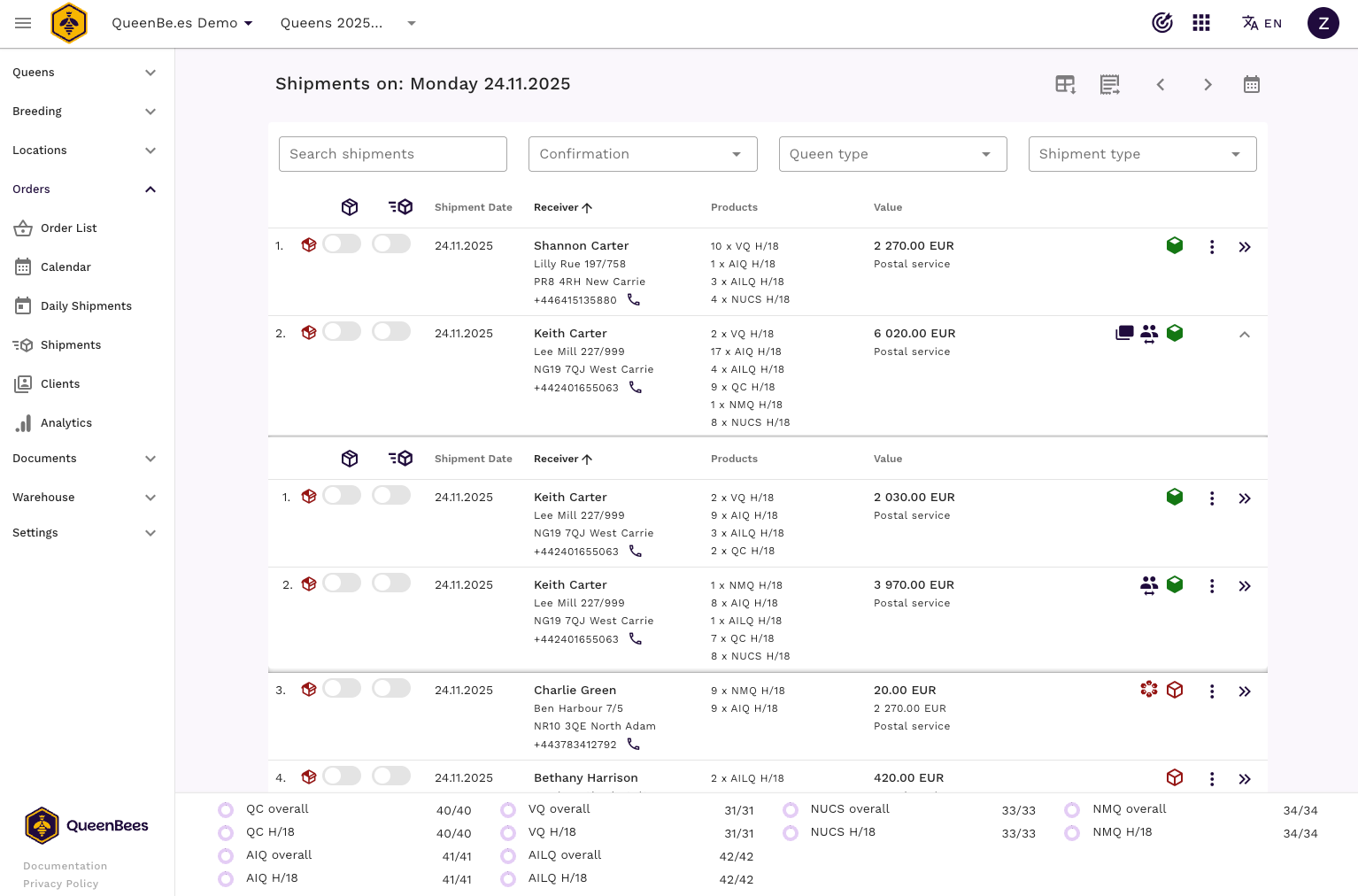
Navigate to the daily shipments section from your main orders dashboard.
Key features overview
- Daily shipment listings: All planned deliveries organized by one shipping date, sorted by customer name
- Shipment and refund confirmation status: Clear indicators showing which shipments are confirmed and which are pending refunds, giving you a quick overview of what needs attention
- Product preparation summaries: On bottom of the screen, you can see total quantities of queens and products needed for this day
- Multi-package grouping: Automatic consolidation when multiple orders go to the same receiver
- Preparation status tracking: Mark shipments as prepared and sent to track daily completion progress
- Real-time updates: if new order is added for the day, it appears automatically in the list
- Export data: Export daily shipment data for offline processing or integration with other systems
- Bulk download of documents: Download all shipping labels and invoices for the day in one click
- Change the day: Easily switch between different shipping dates to plan ahead or review past shipments
- Forgotten shipments alert: System highlights any orders that were not marked as completed on their scheduled day
Daily preparation workflow
Step 1: reviewing the shipping day
Start each shipping day by reviewing the complete list of planned deliveries:
- Open daily shipments for today’s date
- Review total quantities of each queen type and product
- Check special requirements for individual orders
- Note multi-package groupings for efficient preparation
- Check forgotten shipments from previous days and decide on rescheduling or completing
Tip
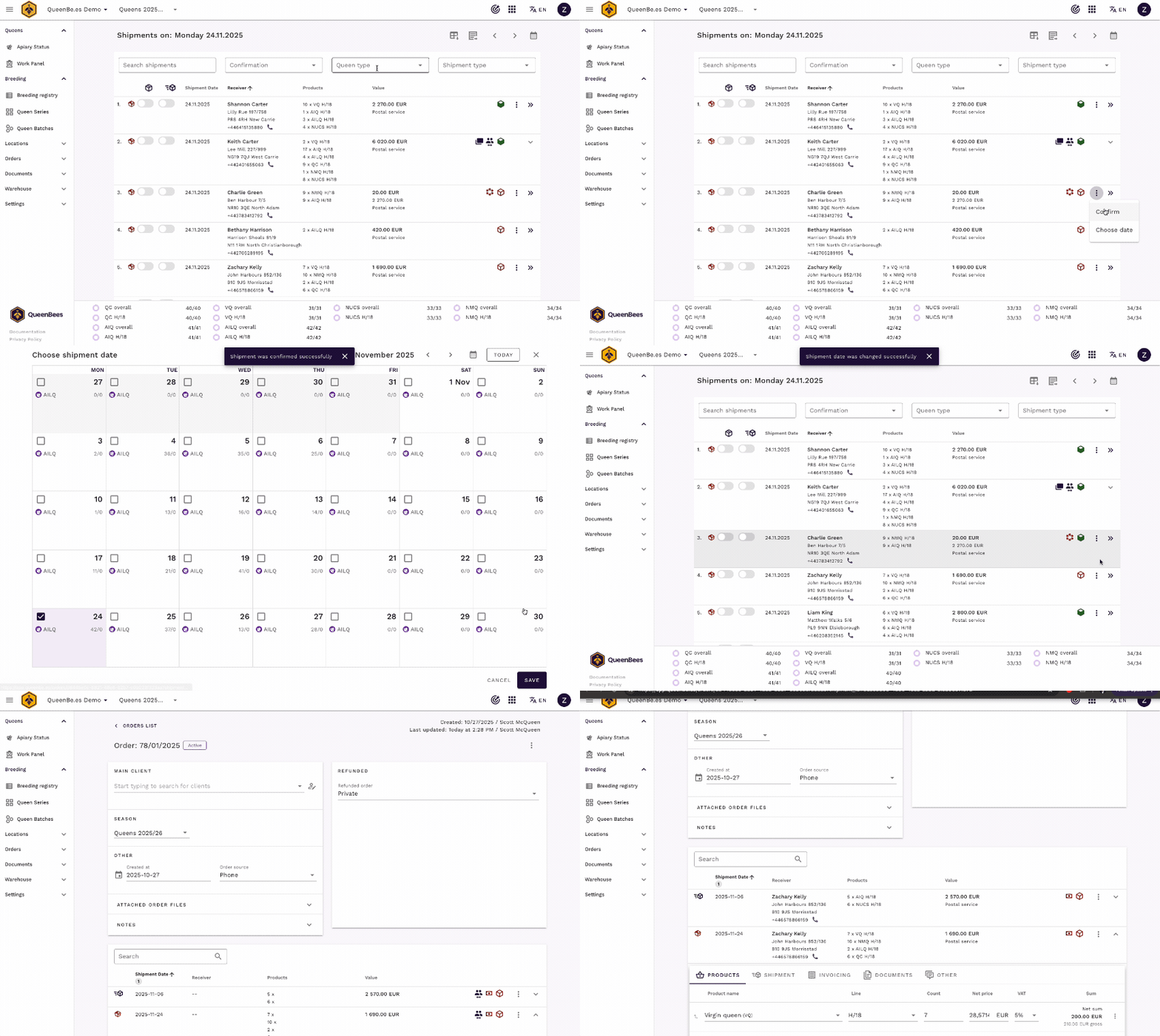
From daily shipments panel you can do some quick actions like confirm or re-schedule shipment. You can always go to the order details if more actions are needed. Use Ctrl + left mouse click to open order details in a new tab without leaving the daily shipments view.
Step 2: product preparation tracking
The system provides detailed breakdown of preparation requirements:
Shipments preparation summary:
- Queen types, lines and quantities: Exact numbers needed per variety

- Special handling notes: Customer-specific requirements added as a comment for shipment

- Shipment products overview: Detailed list of all products to be included in shipments

- Shipping method: Based on customer selection (postal, personal pickup etc.)

- Refund status: Indication if the order is pending refund confirmation, refunded orders can have different overal price of shipment
Step 3: marking shipments as prepared
As you prepare each shipment, mark it in the system:
- Locate the shipment in the daily list
- Click ‘Mark as Prepared’ when packaging is complete
- System updates completion status automatically
- Progress indicators show daily completion percentage

When one type of the products is finalized for day, it will shown as completed in the products summary section. Other products will show remaining quantities to be prepared (goal is zero).

Note
The daily completion status helps you maintain accurate inventory tracking and ensures no shipments are missed during busy periods. Regular status updates throughout the day prevent end-of-day surprises.
Multi-package management
When multiple orders are shipping to the same customer, QueenBees automatically groups them into multi-packages for efficient handling. Products and sums are consolidated accordingly, allowing you to prepare and ship them together faster. You can always expand the multi-package to see individual orders inside.

Support and optimization
Getting help with daily operations
Questions or workflow optimization:
- Contact our support team for daily operations questions
- Visit the contact page for workflow consultation
- WhatsApp support for new features suggestions
Best practices
Efficient daily management of your shipments:
- Start each day by reviewing total products to be shipped
- Mark shipments as prepared immediately after packaging
- Use multi-package grouping to reduce handling
- Monitor completion progress throughout the day
- Plan next days requirements in advance, reschedule clients if needed
Remember: Daily shipments management becomes your operational command center during breeding season. The systematic approach prevents oversights and ensures reliable, professional delivery service for your customers.