Shipping calendar: visual planning for your delivery operations
The shipping calendar is your visual command center for planning and managing queen bee deliveries throughout the breeding season. This powerful tool provides a month-by-month view of your shipment commitments, helping you avoid over-planning and ensure reliable delivery promises to customers.
The calendar displays daily product totals, products capacity visualization, and quick access to order management functions, making it essential for delivery planning during peak season. It’s also useful for conversations with client over the phone, giving you quick insight into available delivery dates.
Tip
The shipping calendar is particularly valuable during busy breeding seasons when you need to balance customer demand with production capacity. Use it to identify optimal delivery dates and prevent scheduling conflicts before they occur.
Understanding the shipping calendar
The calendar view provides a comprehensive overview of your delivery commitments organized by date, with visual indicators showing capacity and product distributions for efficient planning.
Accessing the shipping calendar
Navigate to the calendar page from your main orders section using the main navigation.
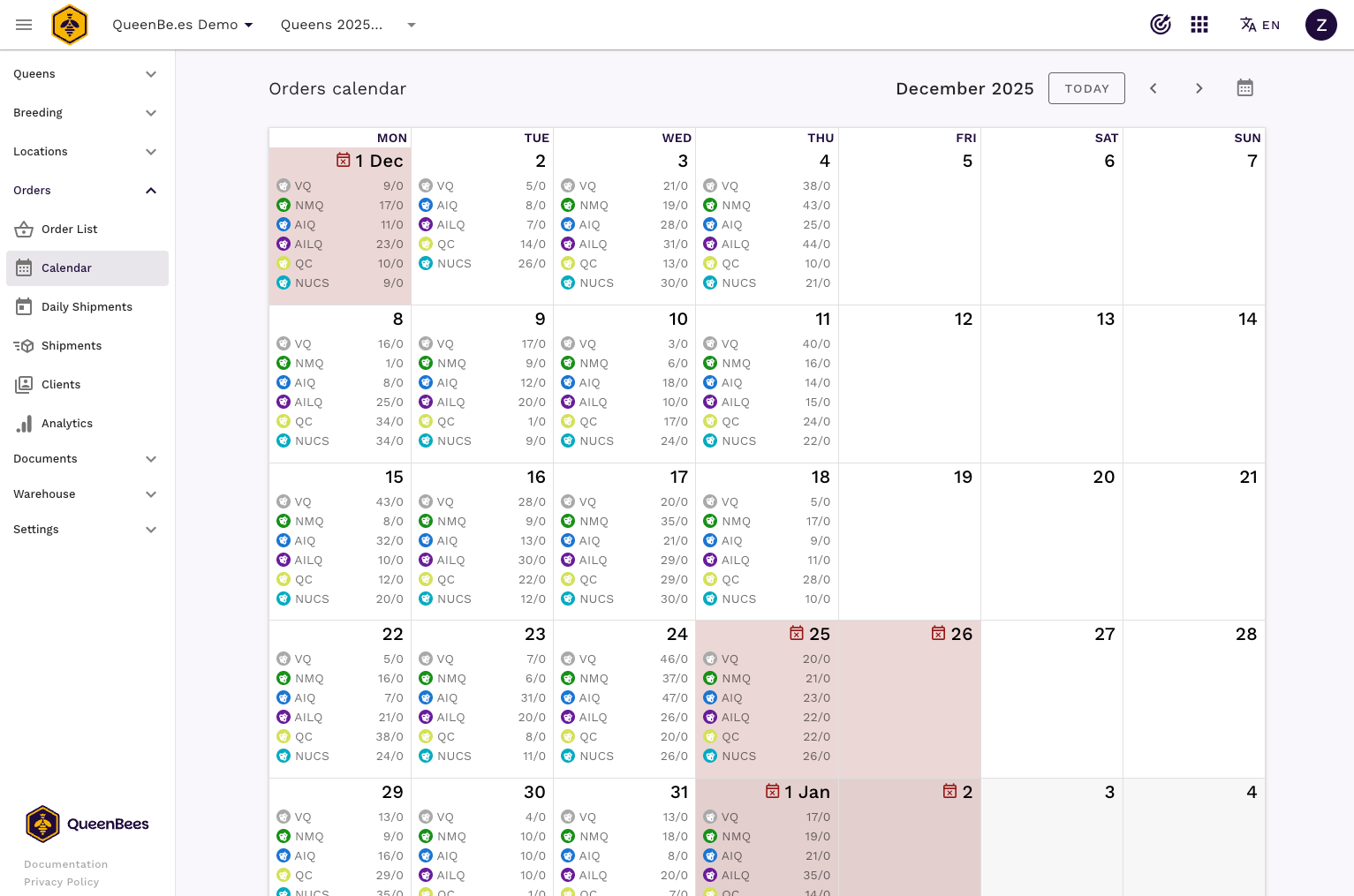
Calendar layout and features
Monthly view organization:
- Month navigation: Easy switching between months with previous/next controls
- Today button: Quick return to current date for immediate context
- Month picker: Jump to specific months for long-term planning
- Current day highlighting: Clear indication of today’s date
Daily information display:
- Product totals: Visual breakdown of queens and products scheduled per day
- Color-coded products: Different queen types distinguished by colors for quick identification
- Capacity indicators: Visual representation of daily commitment levels
- Days-off markers: Clear indication of non-working days when configured
Daily product visualization
Each calendar day shows detailed information about scheduled shipments and product requirements.
Product type indicators
Queen type color coding
- Virgin queens (VQ): Gray indicators for virgin queens shipments
- Naturally mated queens (MQ): Green indicators for naturally mated queen shipments
- Artificially inseminated queens (AI): Blue indicators for artificially inseminated queens
- Artificially inseminated queens with confirmed brood (AIC): Blue indicators for artificially inseminated queens with confirmed brood
- Nucleus colonies (NUCS): Cyan indicators for nucleus shipments
- Queen cells (QC): Yellow-green indicators for queen cell deliveries
Note
The calendar automatically updates as you create, modify, or cancel orders, providing real-time visibility into your delivery commitments and helping prevent double-booking or capacity issues.
Calendar navigation and controls
Month navigation
Navigation controls
- Previous month: Click the left arrow to view earlier months
- Next month: Click the right arrow to view upcoming months
- Today button: Return to current month and highlight today’s date
- Month picker: Click the calendar icon to jump to specific months
Date selection
- Current month focus: Calendar centers on the selected month
- Multi-month planning: Easy navigation between months for seasonal planning
- Year boundaries: Seamless transition across year changes
Interactive day actions
Each calendar day provides interactive functionality for quick order management:
Hover actions
- View orders: Quick access to see all orders scheduled for a specific day
- Add new order: Direct creation of orders with pre-selected delivery date
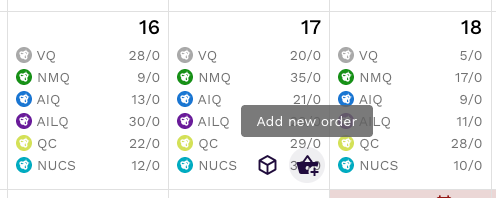
Quick order creation: when you click on a calendar day, you can immediately create a new order with that delivery date pre-selected, streamlining the order creation process during busy periods.
Seasonal planning features
Days-off configuration
When you have seasonal settings configured, the calendar displays non-working days. See seasons and days-off documentation for details on setting this up.
Long-term planning
Seasonal overview
- Monthly commitment patterns: Identify busy and slow periods
- Capacity distribution: Ensure balanced workload across the season
- Customer communication: Provide accurate delivery estimates based on visual capacity
- Resource allocation: Plan production and shipping resources effectively
Support and optimization
Getting help with calendar planning
Questions or planning assistance:
- Contact our support team for calendar and planning questions
- Visit the contact page for workflow optimization consultation or new language request
- WhatsApp support for new features suggestions
Best practices for calendar management
Effective calendar usage:
- Review weekly capacity distribution regularly
- Use visual indicators to balance workload across days
- Plan seasonal capacity adjustments in advance
- Coordinate calendar view with production planning
- Communicate realistic delivery dates based on visual capacity
Capacity planning tips:
- Identify and mark recurring days off in seasonal settings
- Monitor daily commitment levels to prevent overcommitment
- Use color-coded product indicators for quick capacity assessment
- Plan buffer time around peak demand periods
Remember: The shipping calendar becomes your strategic planning tool during breeding season. The visual approach to capacity management helps ensure reliable delivery promises while maximizing operational efficiency and customer satisfaction.