Queen Batches: efficient mass queen management
Queen batches are the next level to efficient queen management in QueenBees, designed specifically for professional, large breeding operations.
Instead of adding queens individually, batches allow you to create and distribute dozens or hundreds of queens across multiple locations with a single operation.
This powerful feature transforms queen breeding from manual, time-intensive processes into streamlined, systematic operations that scale with your breeding program’s growth.
Tip
Queen Batches are ideal when you need to add multiple queens with identical characteristics (same line, birth date, and cycle length) across different locations in your apiary.
Understanding queen batches
A Queen Batch represents a group of queens or queen cells:
- born on the same date,
- from the same queen line,
- with identical breeding parameters.
- (optionally) from the same series
Imagine that you’re going to your location with a basket of 50 freshly born queens that you will add to your hives. That’s a batch for us.
Each batch can be distributed across multiple locations with specific quantities per location.
Key benefits of queen batches
- Efficiency: Create hundreds of queens in seconds instead of hours
- Consistency: All queens in a batch share identical breeding parameters
- Distribution Control: Specify exact quantities for each location
- Tracking: Monitor batch performance and statistics collectively
- Integration: Seamlessly connects with Queen Series for advanced planning
Batch lifecycle and status
Queen batches progress status is automatic and consist of three main states:
- Active: Batch has unassigned queens ready for placement in hives
- Archived: All planned queens have been distributed but may still be active in hives
- Closed: All queens from this batch have completed their lifecycle
Creating your first Queen Batch
Prerequisites
Before creating a Queen batch, ensure you have:
- At least one active location with available hive spaces
- Defined queen lines in your apiary settings
- Proper permissions to manage batches
Step-by-step batch creation
- Access the Queen batches interface
- Navigate to Queen breeding → Queen batches in the main menu
- Click the floating action button (+) to open the batch creation modal
Configure basic batch information
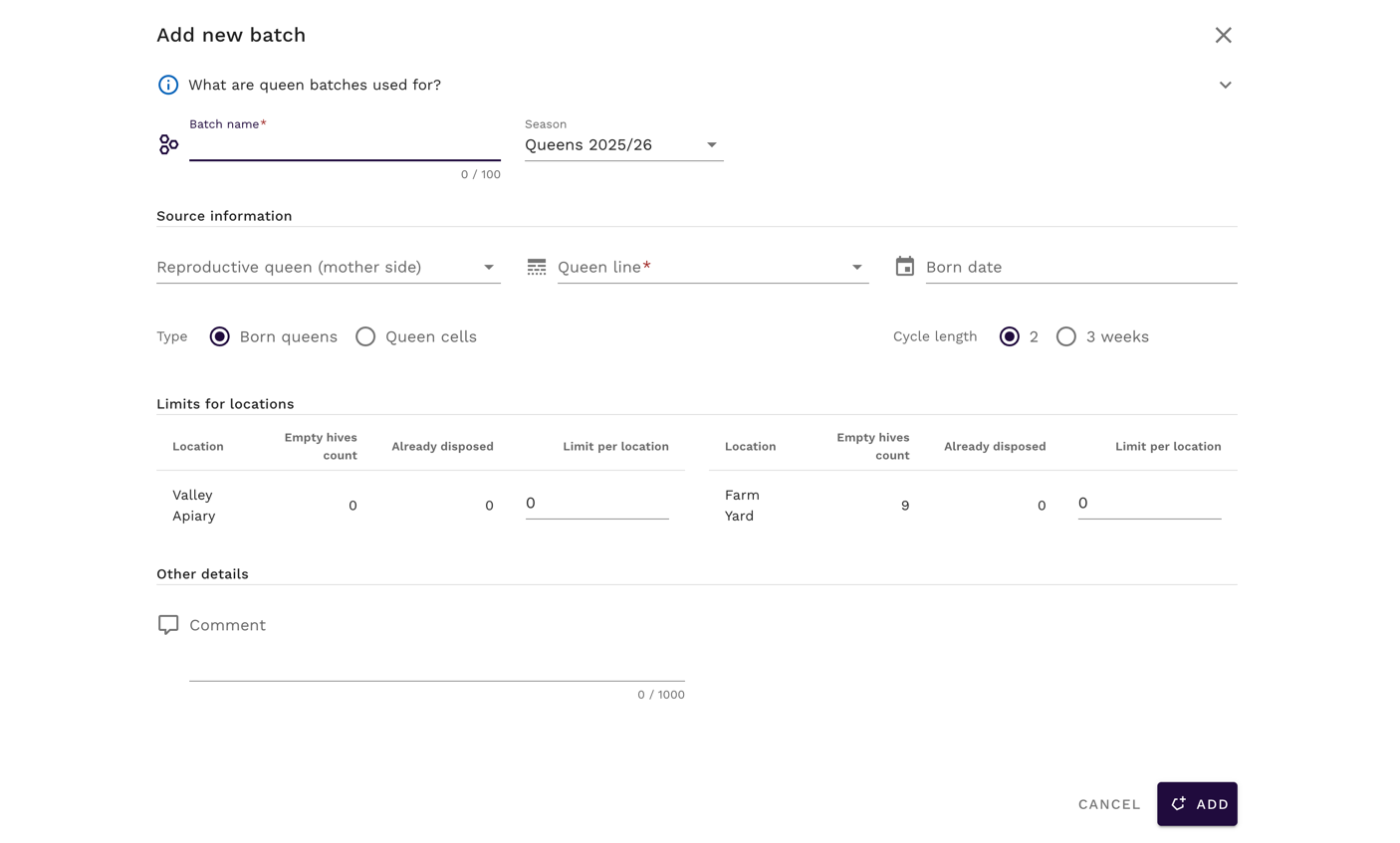
- Batch name: Choose a descriptive name that helps identify the batch purpose
- Serie connection (Optional): If using Queen Series, select the parent serie, this automatically populates many batch parameters
- Season (Optional): Associate the batch with a specific breeding season, current season is chosen by default
Define breeding origin
- Mother queen (Optional): Select from your reproductive queens registry to enables genetic tracking. If Queen Serie is used - this information will be populated from serie.
- Queen line: Choose the genetic line for all queens in this batch
- Birth date: Set when the queens were born or will be born. Can be set in the future for planning purposes.
Set batch parameters
- Batch type: Choose between Queen Cells or Born Queens
- Cycle length: Select 2 or 3 weeks, where 3 weeks is an extended cycle for strengthening hive families before further operations
Configure location distribution
The distribution table shows all your locations with:
- Location name: Your defined apiary locations
- Empty hives: Available spaces for new queens
- Currently disposed: Queens already assigned from this batch
- Limit: Number of queens to create for this location
Setting limits per location:
- Enter the desired number of queens for each location
- Cannot exceed available empty hives
- Use 0 to skip a location
- When series are used, system validates total capacity before creation

- Save and create the batch
- Click “Create Batch” to generate all queens for batch
- Batch becomes immediately visible in your batches overview

Distributing queens to hives
Once you’ve created a queen batch, the next step is distributing individual queens to specific hives in your locations. This process transforms your planned queens from “preplanned” status into active breeding units working in your apiary.
The distribution process is designed for maximum efficiency, with smart batch selection and automated placement features that streamline the workflow from batch creation to individual hive assignment.
Tip
For detailed guidance on the queen distribution process, including step-by-step instructions, troubleshooting tips, and advanced strategies, see our comprehensive guide: Adding Queens from Batches to Hives.
Quick distribution overview
Basic workflow:
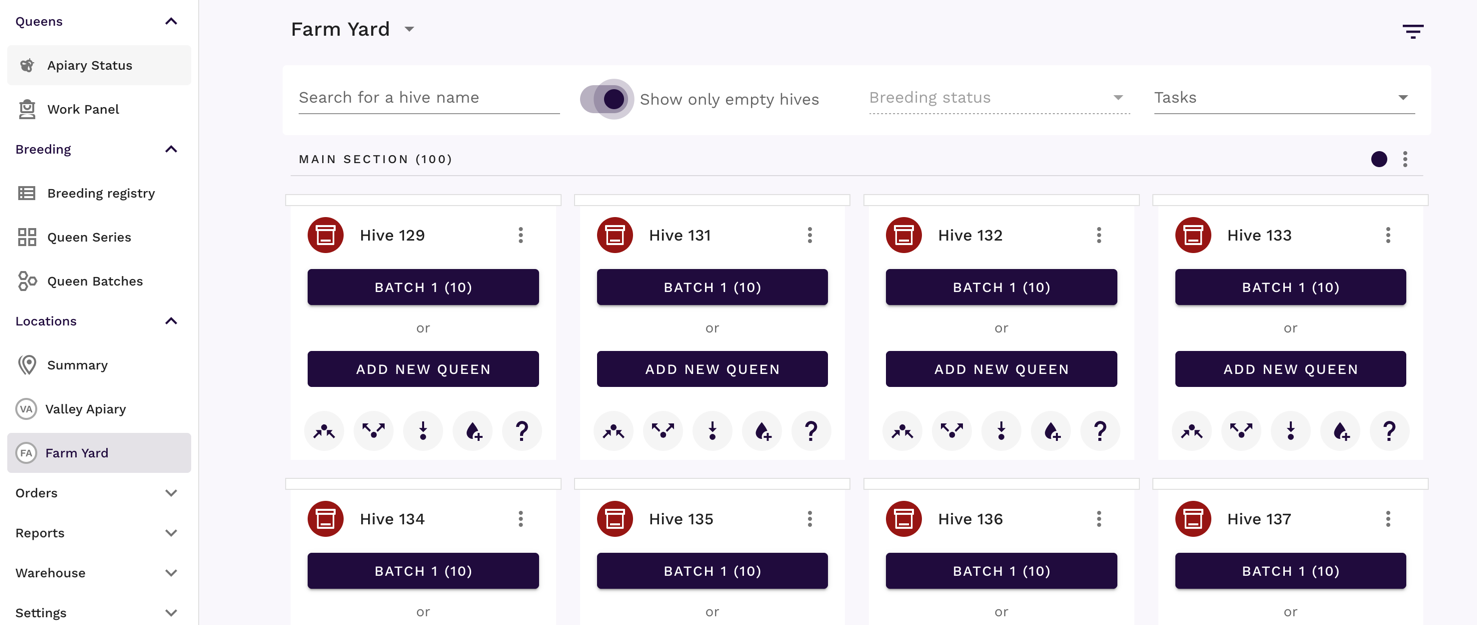
- Navigate to your target location
- Identify empty hives ready for new queens
- Select from available batches (single button or dropdown)
- System automatically assigns queens and updates status
- Monitor batch completion and archiving
Focus mode:
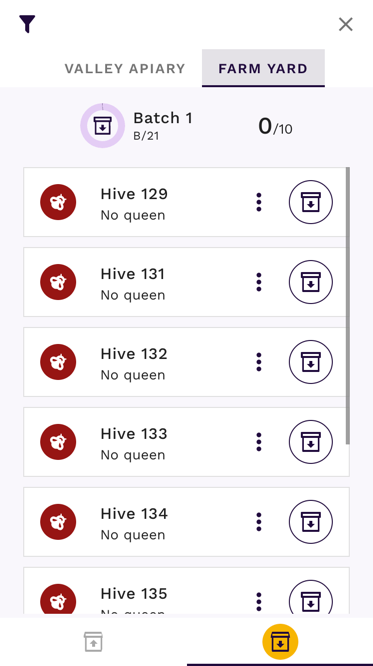
- Use Focus Mode for distraction-free distribution
- Choose Add action in Focus Mode and choose location
- List of available batches appears for quick selection
Managing existing Queen Batches
Batch overview and monitoring
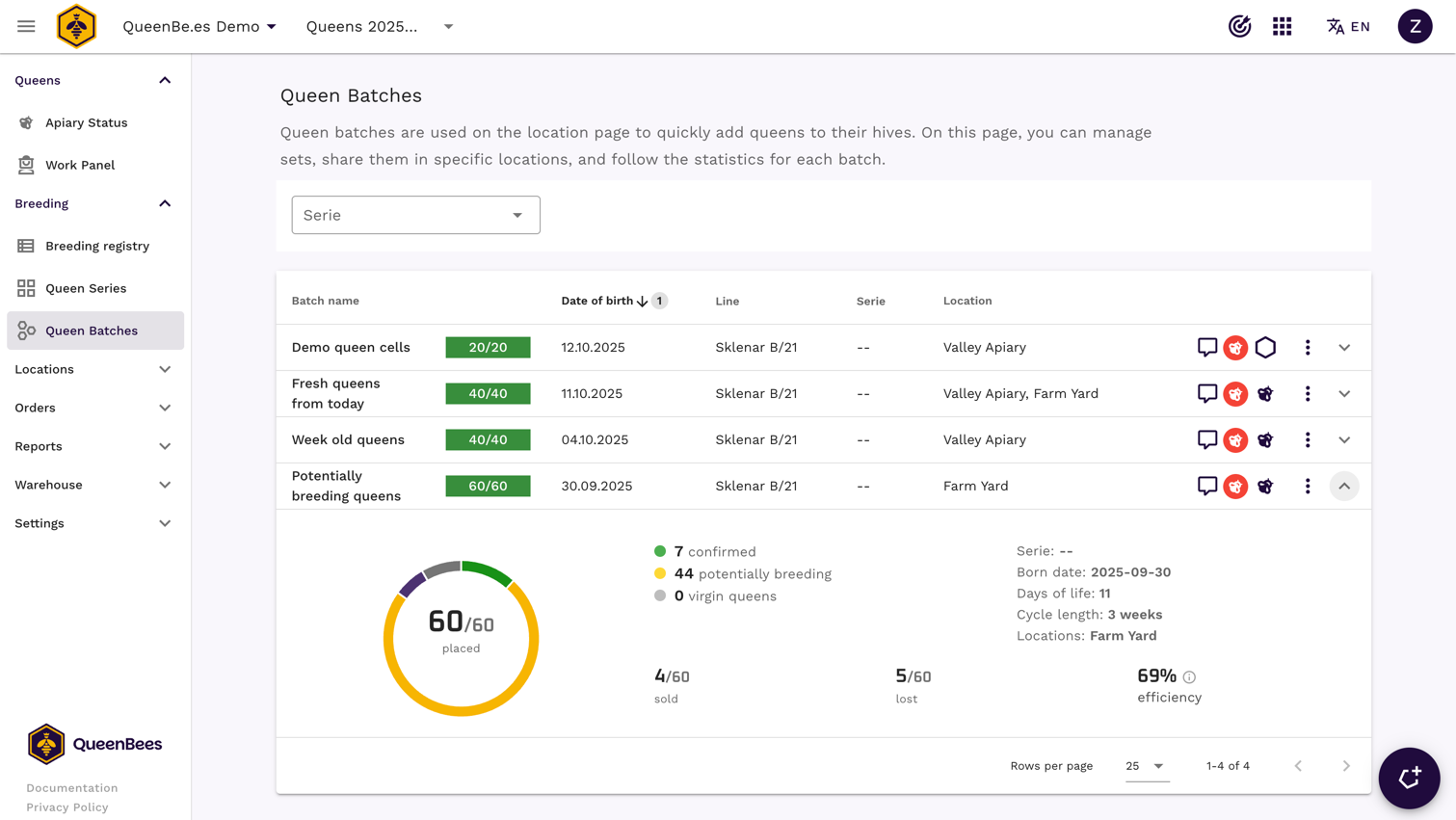
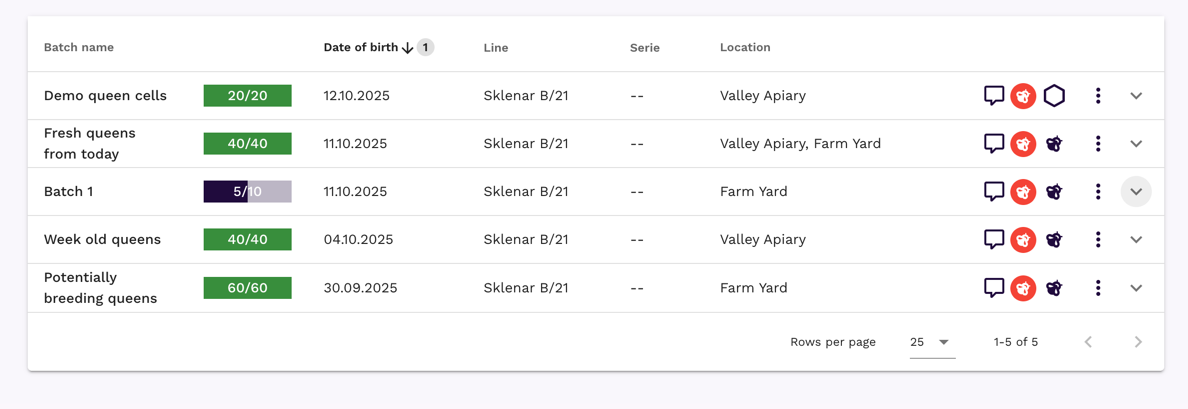
The Queen Batches table provides comprehensive information about all your batches:
- Batch name: Click to expand detailed information
- Status indicator: Visual status of batch distribution progress with color coding
- Birth date: When the queens were born
- Queen line: Genetic lineage abbreviation
- Serie: Associated breeding serie (if applicable)
- Locations: Summary of distribution locations
- Information icons: Quick indicators for comment, mother queen and other useful information
Batch details and statistics
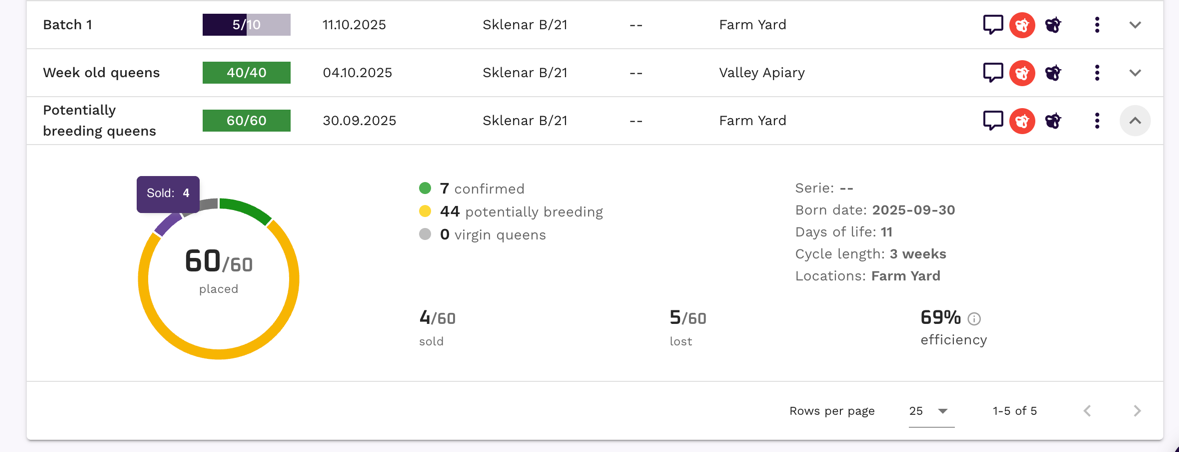
Expanding a batch row reveals detailed information:
Queen Distribution Summary:
- Total queens created vs. planned
- Queens by status (preplanned, active, sold, etc.)
- Location-wise breakdown
Performance Metrics:
- Success rate and efficiency statistics
- Timeline progression indicators
- Financial performance (if sales are tracked)
Editing and updating batches
You can modify existing batches with some limitations:
Editable fields:
- Batch name and description
- Comments and notes
- Location distribution limits (increase only)
Protected fields:
- Birth date (affects queen development calculations)
- Queen line (changes genetic tracking)
- Batch type (structural change)
Warning
Some batch parameters cannot be changed after queens were distributed, providing consistency in breeding records accuracy.
Integration with Queen Series
Queen Batches work seamlessly with Queen Series:
- Series provide information for batch creation
- Batch limits are automatically calculated from current serie data
Next steps
Once you’ve mastered Queen Batches, consider exploring:
- Queen Series: Advanced planning and systematic breeding programs
- Order Management: Working with customer orders and sales
Queen Batches transform individual queen management into scalable breeding operations, making QueenBees the ideal platform for professional queen breeding enterprises.